BAT files for mining, explained
What a miner start script is, how to edit one safely on Windows and Linux, and the anatomy of the command every miner shares.
What a BAT file is
A .bat file on Windows (a .sh file on Linux) is just a text file of commands the system runs in order. Miners ship with one because typing the full start command every time is tedious: double-click the file and the miner starts with your saved settings. There is no magic in it; open it with any text editor and you will find one long command line.
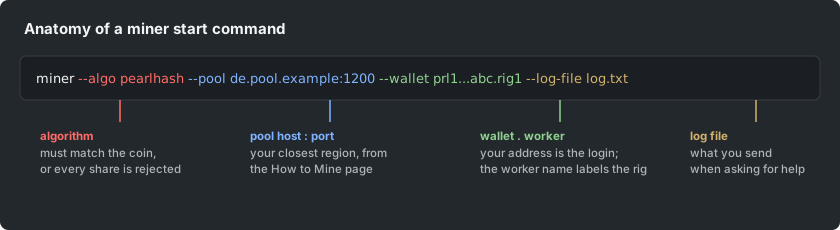
The anatomy of the command
- The executable: the miner program itself, first on the line.
- The algorithm flag: tells the miner what to compute; it must match the coin.
- The pool flag: the stratum host and port of your closest region, from the How to Mine page.
- The user or wallet flag: your address, optionally followed by a worker name after a dot.
- Optional flags: a log file, an API port for monitoring, intensity or tuning options. The setup guides for SRBMiner and bzminer in this help center show each miner's exact flag names.
Editing it safely
Right-click and Edit (do not double-click, which runs it), change only the values, not the flag names, keep everything on one line unless the file already uses continuation characters, and save as plain text. If the window flashes open and closes instantly, add a new line with the word "pause" at the end of the file on Windows: the window then stays open and shows the error message that explains what is wrong.
One file per coin or rig
Keep a separate start file per coin and per meaningfully different rig, named so you can tell them apart. When you change wallet, region or worker name, change it in the file, not in the console: the file is the configuration that survives a reboot.