How to set up ntfy mining notifications
Get alerts on your phone without an account: install the ntfy app, subscribe to the private topic your dashboard shows you, and pick the events you care about.
Open the notification settings
Everything is set up from your own miner dashboard, so there is no account to create and no password to remember. Open the pool site for the coin you are mining, paste your wallet address into the search box on the miner page, then open the Settings tab and choose Notifications.
If you started from the HeroMiners hub instead, the panel there has a button that takes you to the same settings on the pool site. Notifications belong to one pool at a time, so they are always set up on the site of the coin you are mining.
Confirm the address is yours
Anyone can look up any address, so before the pool lets you change a setting it checks that the request is coming from a machine that is actually mining to it. This is the same check that guards your payout threshold, and most of the time it passes on its own, because you are opening the dashboard from the same connection your rig uses.
If it does not pass, the page asks for the IP address of your busiest worker and you can paste it in. The How to find your worker IP address guide walks through where to read that number on Windows, Linux and HiveOS.
Install the ntfy app
ntfy is a small open source app that does one thing: it shows you notifications sent to an address you have subscribed to. Install it on your phone from the app store, or simply open the ntfy site in a browser if you would rather not install anything.
There is no account to create and nothing to log in to. The address itself is the whole arrangement, which is why this channel needs no verification code.
Copy your private topic
Press ntfy in the notification panel. Instead of a code it shows a private topic address that belongs to your wallet, with a copy button beside it. Copy it.
Keep that address private. There is no password in front of it, so anyone who has it can subscribe to the same alerts you do. Treat it the way you would treat a private link rather than a public one.
Subscribe to it in the app
Open the ntfy app, choose to subscribe to a topic, and paste in the address you copied. That is the link finished. Anything the pool sends you from now on arrives in this app.
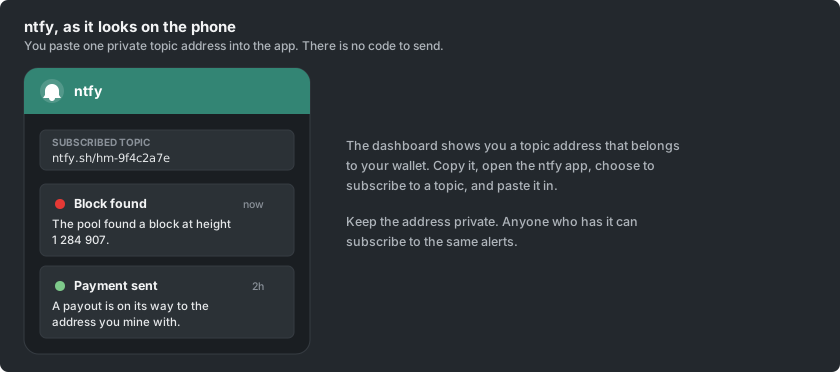
If nothing arrives, check that the address in the app matches the one on the dashboard character for character, since a topic that does not match simply receives nothing rather than reporting an error.
Choose which events alert you
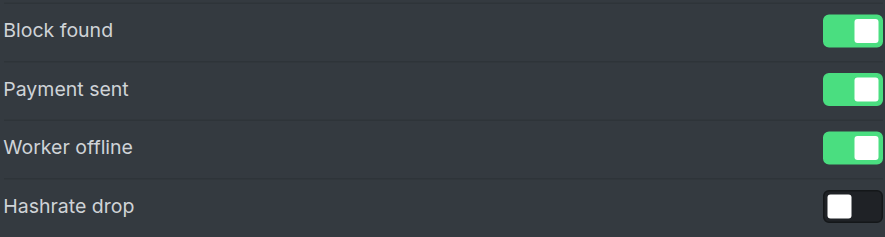
Back on the dashboard the link button is replaced by a switch for each event, so you decide exactly what is worth a notification on your phone.
A block found by the pool, a payment sent to you, a worker that has gone quiet, and a meaningful drop in your hashrate are the events on offer. The switches belong to this channel alone, so ntfy can carry only the urgent ones while a chat channel carries the rest.
Turn it off later
Turning a single event switch off stops that event straight away, and unlinking ntfy on the dashboard stops all of them. Unsubscribing in the app also stops the alerts reaching you, though the cleaner way is to unlink on the dashboard so nothing is sent in the first place.
ntfy has no bot to talk to, so there is no mute command here. Use the event switches, or unlink and link again later, which hands you a fresh topic address.