How to create a Quai (QUAI) wallet
A step-by-step guide to creating a Quai (QUAI) wallet: installing Pelagus, setting a password, backing up your 12-word recovery phrase, and copying the QUAI address a pool pays you to (plus the exchange and mobile options).
Choose an official Quai wallet
Quai's own open-source wallet is Pelagus, a browser extension for Chrome, Brave and Firefox. If you prefer a phone, Koala Wallet supports Quai on iOS and Android. Both are non-custodial: your keys stay on your device, so no company holds your funds or can freeze them. This guide walks through Pelagus in full, then covers the exchange and mobile options.
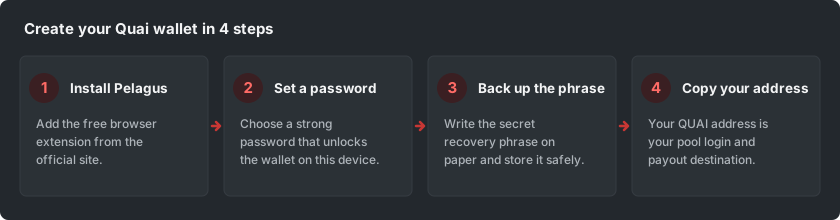
Only ever download a wallet from its official source (pelaguswallet.io for Pelagus, or the coin's own site). Fake wallets in search ads and random download sites are a common way people lose their coins.
Install the Pelagus browser extension
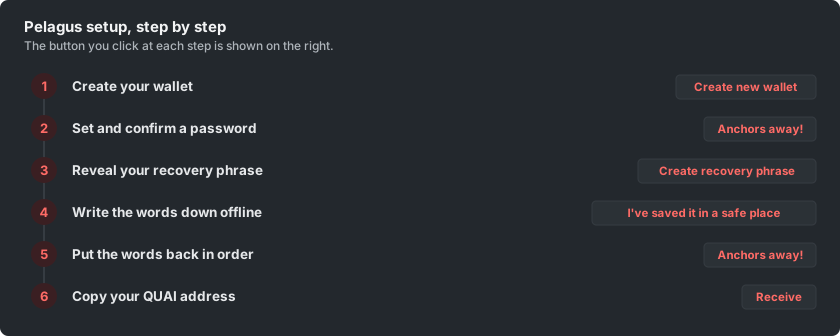
Open the official site pelaguswallet.io and click Download; it opens the Pelagus listing in your browser's extension store (Pelagus works in Chrome, Brave and Firefox). Add it to your browser and confirm. When the install finishes the wallet opens by itself; if it does not, click the extensions (puzzle-piece) icon at the top-right of the browser and pick Pelagus. On the welcome screen, choose Create new wallet.
Set and confirm your password
Set a strong password, type it again to confirm, and click Anchors away! to create the wallet. This password only unlocks Pelagus on this one device; it is not a way to recover your funds. If you ever forget it, you restore the wallet from your recovery phrase instead, so store the password somewhere safe as well.
Create and save your recovery phrase
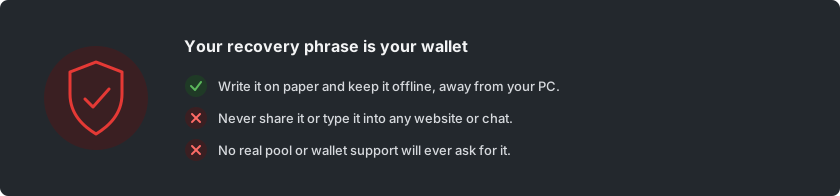
Click Create recovery phrase. Pelagus shows you a secret recovery phrase of 12 words, once. This phrase is your wallet: anyone who has it can take your coins, and if you lose it no one can restore your funds for you, because the wallet is non-custodial.
Write the 12 words down on paper, in the exact order shown, then click I've saved it in a safe place. Do not screenshot the phrase, do not save it in a notes app or the cloud, and never type it into a website. A real pool or wallet will never ask you for it.
Confirm your recovery phrase
To prove you saved it, Pelagus asks you to put the words back in the right order, then click Anchors away! again. This is why the paper copy matters: if you cannot rebuild the phrase now, you would not be able to restore the wallet later either. Once the order is correct, the wallet is created and you can continue to it.
Copy your QUAI address
Open Pelagus and click Receive to see your account address: a string that starts with 0x, for example 0x004b0015A5a719765d2CeBF08dE8cfb965593F17. On Quai the first two characters after 0x mark the shard (the region and zone) the address lives on; the network runs a single shard today, called Cyprus-1, so addresses begin 0x00. Use the copy button to copy the whole address exactly.
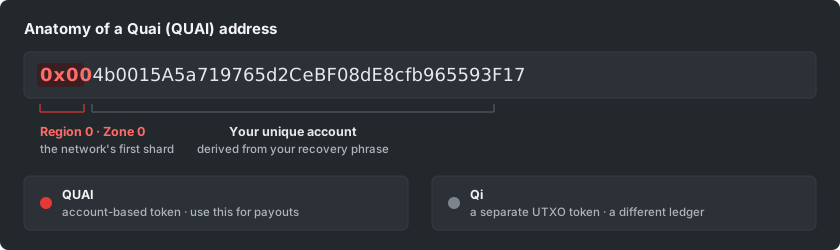
Quai has two token types on one network: QUAI, the account-based token that miners earn, and Qi, a separate UTXO-based token. For mining payouts make sure you copy a QUAI address. That exact string is your login and payout destination on a pool.
Alternative: a QUAI address from an exchange
You can also point mining at an exchange deposit address, if your exchange lists QUAI and supports direct deposits on the Quai network. On the exchange, open Deposit, pick QUAI, and copy the deposit address it gives you. It is quicker to set up, but the exchange holds the keys, so it is not self-custody and the address can change.
One thing to get right: QUAI also exists as an ERC-20 token on Ethereum, so make sure you copy the exchange's Quai-network deposit address (it begins 0x00), not an Ethereum QUAI address, or your mined coins will not arrive. Some exchanges also ignore very small deposits, so a self-custody Pelagus or Koala wallet is the safer choice for mining.
Prefer a phone? Use Koala Wallet
If you would rather keep Quai on a phone, Koala Wallet (by Eucalyptus Labs) supports Quai on iOS and Android. The flow is the same in spirit: install it from the official app store, create a wallet, and back up the recovery phrase with the same care. It is non-custodial too, so the same rule holds everywhere: whoever has the recovery phrase controls the coins.