The miner settings that actually matter
The five settings every miner shares, what each one does, and the defaults you should not change without a measured reason to do it.
The five that matter
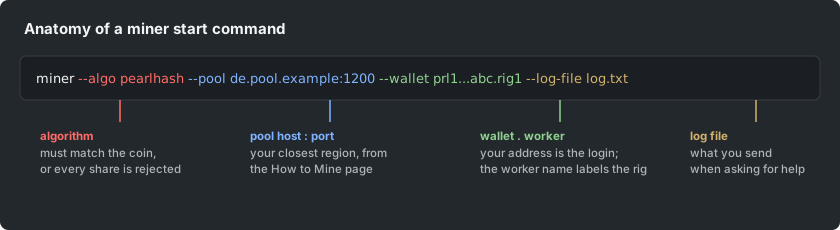
Every miner, whatever its brand, is configured by the same five things: the algorithm, the pool address and port, the wallet (with worker name), the TLS choice, and the tuning options. The first four decide whether you mine at all; only the fifth is about speed. Get the first four from the How to Mine page and treat the fifth as optional homework.
Worker names and multiple rigs
Add a short worker name after your wallet address (a dot between them) so each rig shows separately on the dashboard. Without names, every rig reports as one anonymous worker and you cannot tell which machine dropped. Use plain letters and numbers; keep it short.
TCP or TLS
The same port serves both here: stratum+tcp:// for a plain connection, stratum+ssl:// for an encrypted one. TLS costs nothing meaningful in performance and hides your wallet address from anyone watching the network path; on any connection you do not fully trust, use TLS.
Tuning: change one thing at a time
Intensity, threads and per-GPU flags trade stability for speed. The defaults are chosen to work everywhere; each step away from them is your experiment. Change one setting, run long enough to trust the number (the dashboard's 24-hour average, not the console's instant readout), and keep notes. The GPU tuning article in this help center covers the full method.