How to install the pool as an app on your phone
Add the pool site to your phone home screen so it opens like an app, and unlock browser push notifications on iPhone, where Safari only offers them to installed sites.
Open the pool site on your phone
The pool site can be installed on a phone or tablet as if it were an app, straight from the browser. There is nothing to download from an app store, nothing to sign in to, and it costs kilobytes rather than megabytes, because what gets installed is a shortcut to the site you are already using.
Start by opening the pool site in your phone browser and pasting your wallet address into the search box on the miner page. The site remembers the wallets you look up, so from then on the miner page opens on your own figures however you reach it. Wait for the dashboard to load, then follow the steps below for your phone.
On iPhone and iPad, add it from the Safari share sheet
Safari is the only browser on iOS that can install a site, so use Safari here even if you normally use another one. With the dashboard open, press the share button in the toolbar, the square with an arrow pointing up out of it.
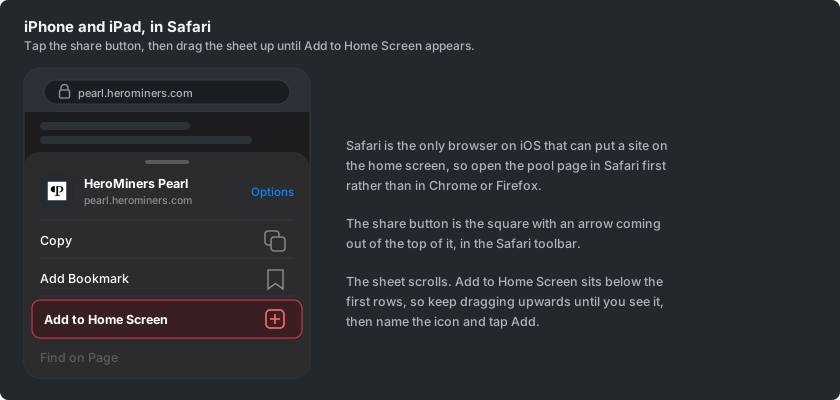
The share sheet slides up from the bottom. Drag it upwards to see the full list of actions, find Add to Home Screen, and press it. Safari offers you a name for the icon, which you can shorten if you like, and then Add puts it on your home screen.
On Android, install it from the Chrome menu
On Android the same thing is done from the browser menu. With the dashboard open in Chrome, press the three dots in the top right corner and look for Install app.
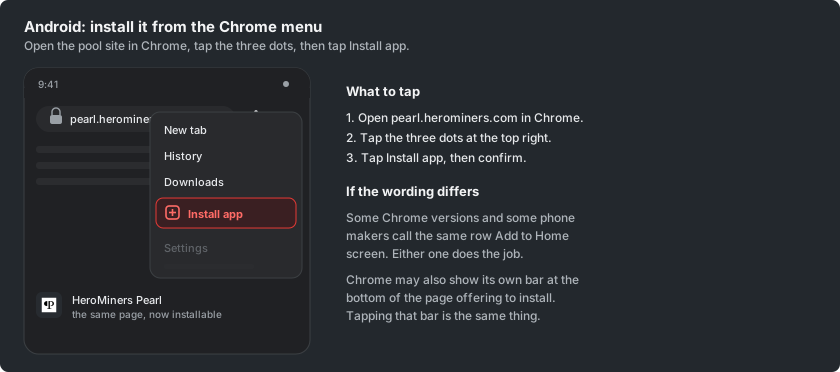
Some Chrome versions call that row Add to Home screen instead, and both do the same thing. Chrome may also offer to install the site by itself, as a bar along the bottom of the page, and pressing that is equally fine.
Open it from the home screen
Press the new icon and the pool opens on its own, with no address bar and no browser tabs around it. It gets its own entry in the app switcher, so it behaves like any other app on the phone.
What it opens on differs by phone. On an iPhone or iPad the icon opens the exact page it was installed from, so installing from your miner page lands you straight on your figures. On Android it opens the front page instead, and your miner page is one press away from there, with your wallet already remembered.
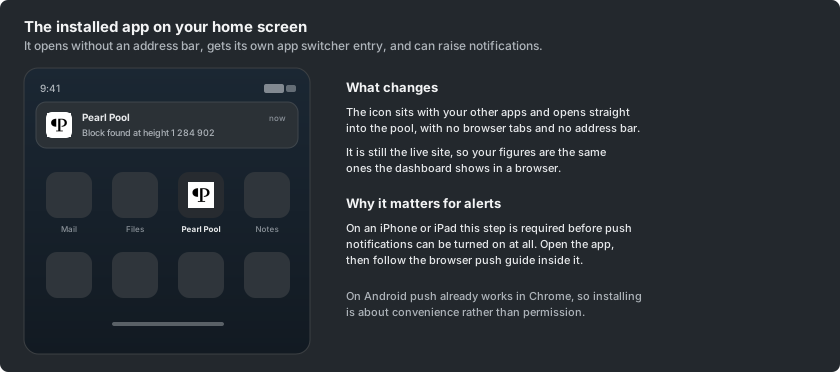
It is still the live site rather than a copy, so the figures are the same ones the dashboard shows in a browser, and it updates itself. When a new version of the site is published the app offers you a short banner to reload into it.
Turn on notifications now that it is installed
On an iPhone or iPad this step is what makes browser notifications possible at all. Safari only offers push to sites that have been added to the home screen, so the permission prompt never appears on an ordinary tab, and it does appear inside the installed app.
Open the installed app, go to the Settings tab on your miner page and choose Notifications. The How to set up browser push mining notifications guide covers the rest, and it is written for exactly this screen.
On Android push already works in an ordinary Chrome tab, so installing there is about convenience rather than permission. If you would rather have alerts in an app you already use, How to set up Telegram mining notifications, How to set up Discord mining notifications and How to set up ntfy mining notifications each link a single channel that reaches every device you carry.