Cryptojacking: when a machine mines for somebody else
How mining malware gets in, why a rig owner is the hardest person to hide it from and the easiest to fool, and how to check and clean a machine properly.
What it is
Cryptojacking is somebody running a miner on hardware they do not own or pay for. It is not a niche: it is the most common thing malware does with a machine once it has one, because the payout needs no victim to be tricked into anything afterwards. The electricity is the victim, and it bills quietly.
It is nearly always Monero. The coin can be mined at a profit on ordinary processors, so a few thousand office desktops are worth having, and its privacy means the money cannot be followed. The program is usually XMRig, an ordinary open-source miner, with the name and configuration changed.
A machine mining for someone else does not act infected in the way people expect. Nothing is encrypted, no file is missing, no ransom appears. It just runs hot, throttles, ages its fans, and costs money.
Why this is different when you already mine
Every generic article says the same thing: look for high processor use, look for heat, look for fans. On a rig, all three are the normal state, so the usual advice detects nothing. Being a miner makes you the best-equipped person to find this and the easiest to fool.
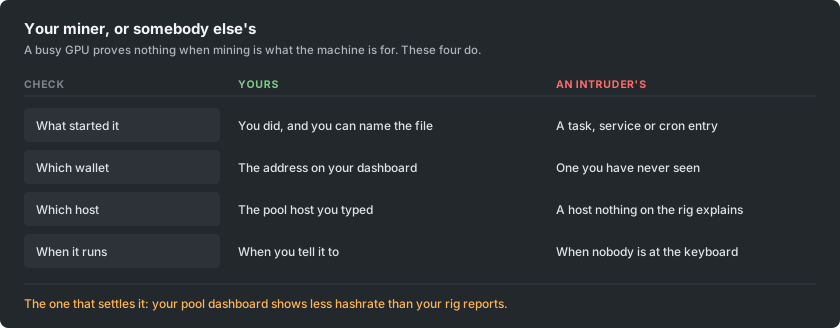
The advantage is that you have something almost nobody else has: a second, independent record of what your hardware produced. Your pool dashboard is measured on someone else's server from work that actually arrived. If the rig reports a hashrate and the dashboard is meaningfully below it, once you have accounted for stale shares, something is consuming the difference.
How it gets in
The routes have not changed much, and none of them requires a sophisticated attacker.
- Cracked and pirated software. Still the biggest single source. A keygen or a patched installer for a paid application is a program you have agreed to run with your own permissions, and the miner rides along inside the archive.
- Anything exposed to the internet without a patch. Old, widely known holes in server software are scanned for continuously, and a miner is the payload of choice because it monetises a machine that holds nothing worth stealing.
- USB. Recent campaigns copy themselves onto removable drives and hide behind a shortcut that looks like the drive icon, which is how a network with no internet exposure still gets infected.
- Container and build images. A base image pulled from a public registry can carry one, and it then mines inside every environment built from it.
- A browser tab, though far less than it once was. Scripts that mine while a page is open were an industry until the largest provider shut down in 2019; they still exist on streaming and download sites, but they stop when the tab does.
The signs on a machine that should be idle
- It never really idles. Fans stay up and the case stays warm with nothing open.
- A process you cannot account for, often named to sit close to a real system one. A single character difference in a familiar name is a common trick.
- Use that drops the moment you open the task manager and returns when you close it. That behaviour is deliberate and is close to proof on its own.
- A scheduled task, service or startup entry nobody created.
- Outbound connections to a host you do not recognise, repeating on a fixed rhythm.
The signs on a rig that should be mining
Here the question is not whether something is mining, it is whether everything that is mining is yours.
- The dashboard sits below what the rig reports, consistently, beyond what stale shares explain.
- Two mining processes where you started one. On a multi-GPU rig it is worth counting.
- Your start script or flight sheet has a wallet address or a host in it that you did not type. Read it, do not glance at it: an address altered in the middle looks identical at a glance.
- A card runs hot and produces nothing on your pool, which is what a second miner pinned to one device looks like.
- It mines when you stopped it. If halting your own miner does not quiet the machine, something else is running.
The wallet swap, which costs more than the electricity
A separate family of malware does something worse and simpler. It watches the clipboard, and when you copy something shaped like a wallet address it replaces it with the attacker's, choosing one that begins and ends with the same characters so a quick check passes. People have lost large sums to this without any mining involved, and the two are often installed together.
For a miner there is a second version of the same idea: the address inside a start script or a flight sheet is rewritten once, and every payout afterwards goes somewhere else. Nothing breaks. The rig mines perfectly. The money simply arrives at a different wallet, and the usual way people discover it is wondering why a payout never came.
The defence is dull and works. After pasting an address anywhere that matters, check the whole thing rather than the ends, and confirm the address on your dashboard is the one you meant. If your payouts stop while your hashrate does not, check the address before anything else.
How to check, in order
- Compare the two hashrates. Rig-reported against pool dashboard, over a day rather than a minute.
- Read your own configuration. Every wallet address and every host, character by character, on every rig.
- Stop your miner and watch. A machine that stays busy afterwards has something else running.
- List what starts by itself. Scheduled tasks and services on Windows, timers and cron on Linux, plus whatever runs at login.
- Look at outbound connections while your own miner is stopped. Anything still talking on a rhythm is worth naming.
- Scan with something reputable, but do not stop at a clean result. Miners are routinely modified until scanners no longer recognise them, which is why this step is last rather than first.
Removal is not deleting the file
These are built to come back. Deleting the program while the thing that starts it survives buys a few minutes. Remove the scheduled task, the service, the startup entry, the cron line and the registry key, then the file, then reboot and check that nothing has returned.
On a machine that mattered, and especially on anything that has held a wallet or a private key, treat a rebuild as the honest option. The same access that installed a miner could install anything else, and a modern campaign will have collected credentials on the way through. Change the passwords that machine has seen, from another device.
Staying clean
The rules that actually prevent this are boring, and they are the ones people skip because mining involves downloading unsigned software from strangers.
- Miners come from the project's own release page, and you check the published checksum. A miner from a forum link, a video description or a repacked archive is the single most likely way a mining machine gets infected, precisely because you were expecting a warning and dismissed it.
- Never run cracked software on a machine that mines or holds a wallet. Ever. The two habits do not mix.
- Patch anything exposed to the internet. Most infections are automated and pick machines by version number.
- Keep the wallet you are paid to separate from the machine that mines. A rig only needs an address, never keys.
- Check your payout address after any change to a rig, and again after anything unexpected happens to it.