A card stopped working: what to check before deciding it is dead
The order to swap parts in so the fault has only one place left to hide, what the common symptoms usually mean, and how to handle a return if it really is the card.
It is usually not the card
A card that has disappeared from the rig has a short list of suspects, and the card is near the bottom of it. Above it sit the riser, the riser's power cable, the slot, the card's own power cable and the software, all of which fail more often and all of which cost less to replace.
So the method is elimination in a fixed order: change one thing at a time, cheapest and most likely first, and keep going until the fault has one place left to be.
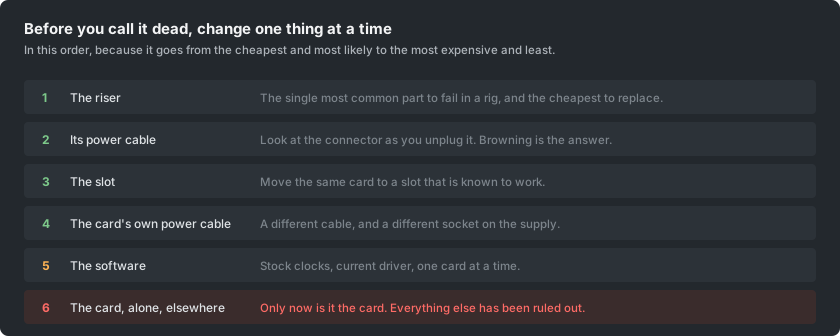
The ladder
- Swap the riser for a known-good one. Risers fail more than anything else in a rig, and a spare on the shelf answers this in two minutes.
- Swap the riser's power cable, and look at both connectors as you unplug them. Browning or a smell is the answer, and it means the cable and whatever it was plugged into.
- Move the card to a slot that is known to work, and move a known-good card into the slot the failed one was in. Doing both tells you which of the two is at fault instead of only suggesting it.
- Change the card's own power cable, and use a different socket on the power supply.
- Reset the software: stock clocks, current driver, one card in the rig. An undervolt that was stable in winter can stop being stable in summer, which looks exactly like a hardware fault.
- Only now, test the card alone in another machine. If it fails there too, it is the card.
What the symptoms usually mean
- Missing from the list of cards entirely: riser or slot far more often than the card.
- Present but producing nothing: usually the driver or the clocks, sometimes memory that has stopped being stable.
- Fine for twenty minutes then gone: heat. Look at temperatures before anything else, and at the paste and pads if the temperatures are high.
- Errors rather than a crash: memory, especially on a card that has been running hot. Bring memory clocks back to stock and see whether they stop.
- The whole rig reboots: the power supply or a cable, not the card. A card that fails does not usually take the machine with it.
- It works alone but not in the rig: power. The supply, the cabling, or the circuit, in that order.
Before you send anything back
- Put the original settings back. Stock clocks, stock power limit, stock fan curve, original BIOS if it was ever changed. A card that arrives with a modified BIOS is a card that will come back.
- Clean it. This is not cosmetic; a returned card thick with dust invites a decision about how it was treated.
- Photograph it before it goes into the box. Every side, the connector, the serial number, and the packaging once it is sealed. This costs nothing and settles arguments.
- Find the receipt and the serial number. Coverage is usually tied to one or the other.
- Get the authorisation before shipping. Almost every manufacturer requires it, and a card that arrives without one can be refused or lost internally.
Two things worth knowing about coverage
Warranties on graphics cards are frequently non-transferable, so a card bought used often has none regardless of its age. Some manufacturers do transfer, so it is worth checking for the specific brand rather than assuming.
Several manufacturers also state that using a consumer card for mining voids the warranty. In practice the useful position is to treat any coverage as a bonus rather than a plan, and to keep a spare card or two if the rig earning matters to you. A rig that cannot lose a card without stopping is a rig with a single point of failure, and cards fail.
If it is genuinely dead
A card out of coverage is not always finished. Fans, thermal paste and thermal pads are all replaceable and account for a large share of what actually stops a mining card working, and the tools are ordinary.
Beyond that, repair shops that work at the component level exist and are worth a quote before the card is scrapped, particularly for cards that were expensive when new. And a card that cannot be repaired is still worth something as parts: its cooler, its bracket and its fans all fit other cards of the same family.