How to read your mining dashboard
A tour of your miner dashboard: hashrate averages, workers, balances, blocks and payments, and what each number is really telling you.
Finding your dashboard
There is no login: type your wallet address into the search box on any page and your dashboard opens. Everything it shows is your address's slice of the pool, updated live, so bookmark the page and it is always current.

Hashrate and workers
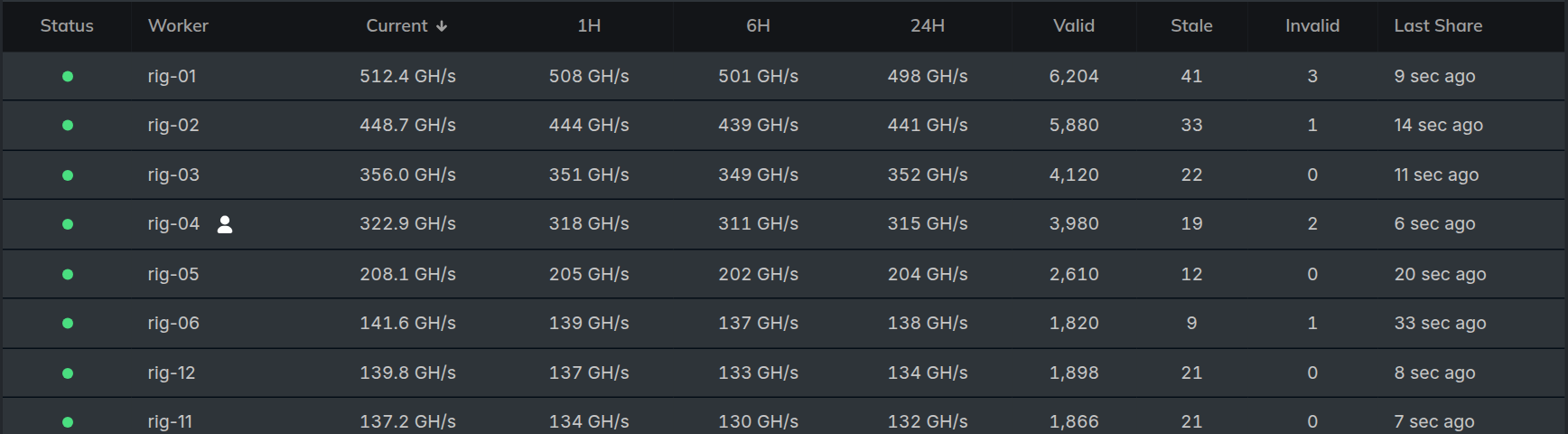
The hashrate panel shows your current pool-side speed and a rolling average; compare it against your miner console using the 24-hour figure, not the live one. The workers list breaks your total down per rig, so you can spot a single machine that has gone offline or slowed.
Balances, blocks and payments
Your balance splits into pending (the estimated value of blocks still maturing) and confirmed (the payable amount waiting for the next hourly payout). The blocks and payments panels list what the pool has found and what has been sent to you, each checkable on the block explorer.
If the pool is running PPS+, read those two the other way round: confirmed is where your earnings arrive, share by share, and pending is only the extra a maturing block still owes you from its transaction fees. A PPS+ block row therefore shows a small amount beside a separate share earnings figure, which is the money that already reached your confirmed balance for that round.
The live stream
The Live tab streams your events as they happen: accepted shares, connects, disconnects and block finds. It is the quickest way to confirm a rig is working right now, and to catch stale shares or a flapping worker in real time.