Set up an SSL mining proxy
Route every rig through one server you control: what an SSL mining proxy is, when you need one, how to set it up, and why it clears the shared worker name warning.
What an SSL mining proxy is
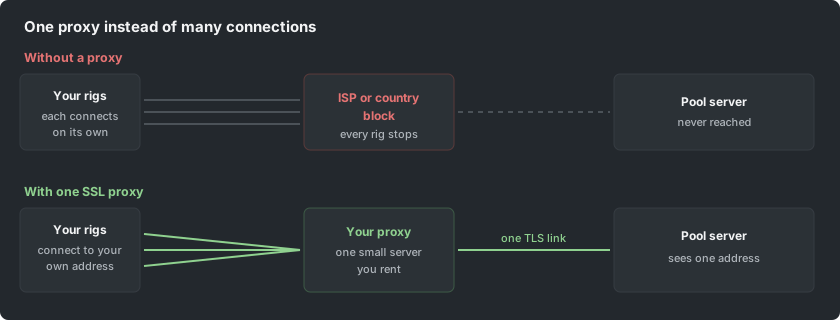
A mining proxy is one small server that you rent and control. Your rigs connect to it instead of connecting to the pool, and it holds a single encrypted connection out to the pool on their behalf. Nothing about your mining changes: the same shares are submitted, the same worker names are used and the payouts are identical. What changes is the path.
It is called an SSL proxy because the link between your proxy and the pool is a normal TLS connection on port 443, which is the same port every website uses. A network that blocks mining ports or mining domains usually cannot tell that link apart from ordinary web traffic.
When you actually need one
Most miners never need a proxy. Reach for one only when one of these is true.
- Your ISP or your country blocks the pool hostname or the mining ports, and changing DNS did not fix it.
- You run rigs in more than one place and want them to reach the pool through a single route.
- You have many rigs behind one slow or unstable uplink and want one connection out instead of dozens.
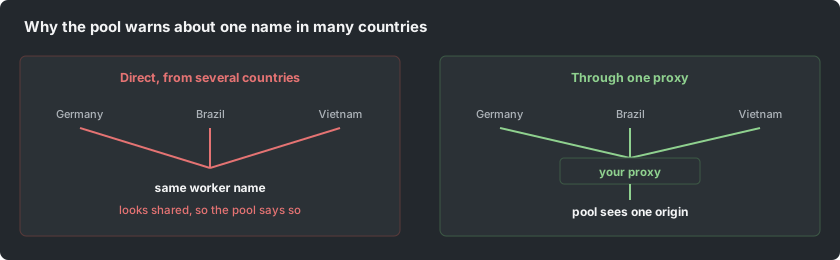
- The pool tells you the same worker name is being used from several countries and those rigs really are all yours.
If none of those is true, a proxy only adds a machine that can fail. Mine directly.
Why it clears the shared worker name warning
Your dashboard warns when one worker name is seen from more than one location (two mining server regions are enough, even inside one country), because from the pool side that looks like the same name being used by more than one person. If your rigs are genuinely spread out, every one of them shows up as its own origin.
Sending them all through one proxy means the pool sees a single origin, so the warning stops. Giving each rig its own worker name fixes the same thing without a proxy, and it is the simpler answer when the rigs are all in one place.
What you need
- A small virtual server in a country that can reach the pool. The cheapest tier is enough: a proxy forwards bytes, it does not hash.
- Root access on it, and the ability to open one inbound port for your rigs.
- The pool hostname you want to reach, from the list further down.
The simplest setup: stunnel
stunnel wraps a plain connection in TLS. Your rigs speak plain stratum to the proxy on your own port, and stunnel speaks TLS to the pool. Install it from your distribution, then use a configuration of this shape.
[mining]
client = yes
accept = 0.0.0.0:4444
connect = de.pearl.herominers.com:443
verifyChain = no
Start the service and point a rig at your proxy address on port 4444 with a plain stratum URL. If the miner connects and shares are accepted, the path works. Only then move the rest of the rigs over.
Replace the connect line with the host and port of the coin you mine. Keep the accept line on an address your rigs can reach and nothing else can: a proxy open to the whole internet will be found and used by strangers.
The alternative: nginx stream
If the proxy already runs nginx, its stream module does the same job and keeps everything in one configuration file.
stream {
  server {
    listen 4444;
    proxy_ssl on;
    proxy_pass de.pearl.herominers.com:443;
  }
}
This needs nginx built with the stream module, which most distribution packages include. Reload nginx and test with one rig exactly as above.
Pointing your rigs at it
Change only the pool address in each rig. The wallet address, the worker name and every other option stay as they are.
-o stratum+tcp://YOUR-PROXY-IP:4444 -u YOUR_WALLET.rig1 -p xGive each rig its own worker name even behind a proxy. The proxy hides where they are, so the worker name is the only thing left that tells them apart on your dashboard.
Which host to connect to
Every pool answers on port 443 with TLS, and on its own plain port without. Pick the region closest to your proxy, not to your rigs: the proxy is the machine that holds the connection.
- Alephium: alephium.herominers.com
- Beam: beam.herominers.com
- Conflux: conflux.herominers.com
- Ergo: ergo.herominers.com
- Ethereum Classic: etc.herominers.com
- Iron Fish: ironfish.herominers.com
- Kaspa: kaspa.herominers.com
- Monero: monero.herominers.com
- Pearl: pearl.herominers.com
- QRL: qrl.herominers.com
- Quai Network: quai.herominers.com
- Quantus: quantus.herominers.com
- Ravencoin: ravencoin.herominers.com
- Salvium: salvium.herominers.com
- Warthog: warthog.herominers.com
- Xelis: xelis.herominers.com
- Zano: zano.herominers.com
- Zephyr: zephyr.herominers.com
Each pool page lists its regional hostnames and ports on its How to Mine page. Put the region prefix in front of the host, for example de.pearl.herominers.com.
Common mistakes
- Leaving the proxy port open to the internet. Restrict it to your own addresses with a firewall rule.
- Renting the proxy in the same country that is doing the blocking. Pick one that can reach the pool.
- Moving every rig at once. Move one, confirm accepted shares, then move the rest.
- Expecting more hashrate. A proxy changes the route, never the work; if anything it adds a few milliseconds.
- Forgetting the proxy exists. It is another machine that can go down, so watch it like a rig.
Is it worth it
If a block is stopping you from mining at all, yes: a proxy is the cheapest way around it. If you are simply tidying up a warning on your dashboard, giving each rig its own worker name is free and does the same job. Reach for a proxy when the route is the problem, not the names.