Buying a used card that has been mining
What a year of mining actually wears out, why a mined card is often in better shape than a gamed one, and the tests that separate a bargain from a problem.
The fear and the fact
Used cards that have been mining sell at a discount, and the discount is bigger than the risk. That is the short version, and it is worth understanding why, because the reasoning also tells you what to check.
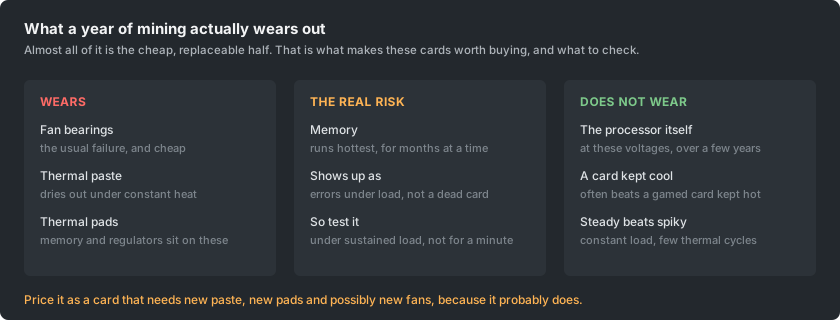
The parts that wear are the cheap, serviceable ones: fan bearings, thermal paste, thermal pads. The part everybody worries about, the processor itself, is not meaningfully aged by a couple of years at the voltages these cards run.
Why constant load can be kinder than gaming
This is the part that sounds like special pleading and is not. What ages solder joints and cracks thermal interfaces is thermal cycling: heating up and cooling down, over and over, with everything expanding and contracting at slightly different rates.
A gaming card does that several times a day for years. A mining card that was left running warms up once and stays there. Steady is easier on a board than spiky.
The caveat is that this only holds if the card was kept cool. A card that ran at its thermal limit for a year is a different proposition, and it is what the checks below are for.
What to ask the seller
- How long, and at what power limit. A card run undervolted for two years is often in better shape than one run at stock for one.
- What temperatures it ran at, memory as well as core. Memory temperature is the number that matters most and the one people are least likely to have watched.
- Has the paste or the pads been changed, and when.
- Is it the original cooler and the original fans. Replacement fans are not a red flag, they are a sign somebody maintained it, but they should be mentioned rather than discovered.
- The original purchase date and whether any warranty is left. This is worth asking even though the answer is usually unhelpful, for the reason below.
A seller who answers all five specifically is a different seller from one who says it was barely used. The specific answers are worth paying more for.
Do not count on the warranty
Two things get in the way, and both are common enough to assume rather than hope about.
Many manufacturers make the warranty non-transferable, so it belongs to the original buyer and ends when the card is sold. Others do transfer it, and a few tie it to the serial number regardless of owner, so it varies and is worth checking for the specific brand rather than assuming either way.
Separately, several manufacturers state outright that using a consumer card for mining voids the warranty. Whether that is enforceable where you live is a question for somebody else, but as a buyer the practical position is the same: price the card as though it has no warranty. If one turns out to exist, that is a bonus rather than part of the deal.
Testing it, in the order that finds problems fastest
- Look at it before it goes anywhere near a machine. Dust is fine and expected. Browning around the power connector, a bent bracket, a bowed board, or a smell, are not.
- Spin the fans by hand. Grinding, rattling or resistance means bearings, which is cheap to fix but should be in the price.
- Run it under sustained load, not for two minutes. Thirty minutes is a minimum and an hour is better, because thermal problems appear when everything has warmed through, not at the start.
- Watch memory temperature specifically, not just core. Memory is where mining puts its heat, and dried-out pads show up there first.
- Test the memory for errors under that load. This is the single most valuable test for a mined card, because degraded memory shows up as errors rather than as a dead card, and errors are exactly what will cost you shares later.
- Check it holds its clocks. A card that quietly steps down after twenty minutes is telling you about its cooling.
- Plug a display in and look at the picture. Outputs go unused for years in a rig and a dead port is easy to miss.
Budget for the refresh
Assume the card needs new thermal paste, new thermal pads and possibly new fans, and price it that way. On most cards this is an afternoon and a small amount of money, and it turns a card of unknown thermal history into one you know about.
Pads are the part people skip and the part that matters most: they are what conducts heat off the memory and the voltage regulators, and they are the thing that dries and hardens. Match the thickness the card came with rather than guessing, because a pad that is too thin conducts nothing and one too thick holds the cooler off the die.
When to walk away
- Any browning or melting at the power connector. That is heat where it should not have been, and you cannot see what it did underneath.
- A refusal to let it be tested under load, or a sale that has to happen today.
- Memory errors that do not go away when the card is set to stock clocks.
- A card that will not hold clocks after twenty minutes and cannot be explained by paste and pads.
- A price that is not actually a discount. If it is close to a new card of similar performance, the warranty and the unknowns are worth the difference.